
How to Start Making Music on Your Computer: A Complete Guide

How to Get Started: The Big Picture
Making music on a computer is one of the most exciting creative paths you can take - but it’s also one of the most confusing places to begin. There are endless tools, endless tutorials, and endless opinions about what you “must” have or “must” learn before you’re allowed to start.
Let's clear all that out of the way - having a clear starting point is more important than the gear you choose.
Before diving into the fine details, having a high-level overview provided by our roadmap to digital music production will give you the big-picture clarity you need to move forward fast.
This guide is here to give you a clean, simple starting point. No overwhelming stuff. No assumptions about what you already know. Just a clear path forward - one step at a time.
Whether you’ve never opened a DAW before or you’ve tried a few times and felt lost, this main article will help you build confidence, understand the essentials, and actually start making music you’re proud of.
Think of this as your map. Each section below introduces a core idea you’ll need as a music producer, and each one links to a deeper guide where you can explore the topic at your own pace.
Let’s get you moving.
Prefer to watch or listen? Check out the video below, or continue reading below for the full deep-dive guide.
What Do You Actually Need to Record Music at Home? (the Absolute Minimum Setup)
One of the biggest myths in music production is that you need a full studio to get started. You don’t. Not even close.
In fact, most producers slow themselves down by trying to buy their way into creativity. They spend weeks researching gear, comparing interfaces, debating headphones, and watching “Top 10 Must‑Have Plugins” videos… all before making a single sound.
You don’t need any of that.
You can start making music today with:
A computer
A DAW
Headphones or speakers
A willingness to experiment
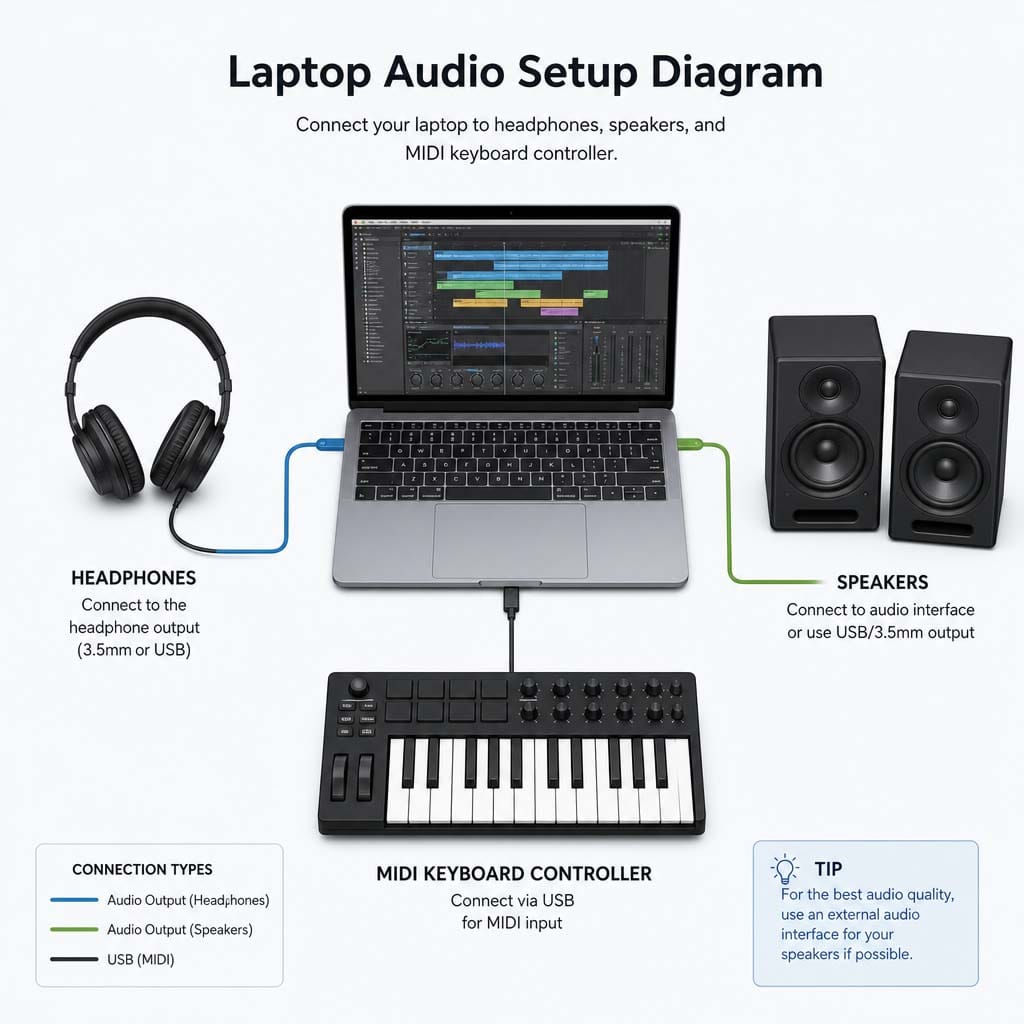
That’s it.
Everything else - MIDI keyboards, audio interfaces, microphones, fancy plugins - is optional. Helpful, sure. But optional.
Starting simple gives you two huge advantages:
You learn faster. Fewer tools means fewer distractions. You focus on the music, not the gear.
You avoid getting overwhelmed. When you only have a few things to work with, you naturally learn how they behave. That builds confidence quickly.
When you break down the true essentials, the “nice to haves,” and the things you can safely ignore until much later, you’ll know exactly what you need - and what you don’t.
Let's take a moment to touch on the computer side of things before we go deeper into the music side.
Choosing the Best Laptop & Gear for Producers
Do you need a supercomputer to run music production software successfully? Definitely not.
But what is important to focus on for a computer that is going to focus on music production?
Here are some rules of thumb to guide you:
CPU: This is the brain of your computer. A better brain can handle more tasks at the same time without choking. Music software like virtual instruments and plugins will use your CPU's resources. Because of this, having a CPU that has enough horsepower to keep up with these demands is important.
Memory: This is the 'size of the desk' of your computer. The brain might be doing calculations, but it still needs a desk to work on. A small desk will quickly fill with files and work stuff. If the desk fills up then your CPU has trouble working efficiently. Your virtual instruments (especially) and plugins will also need memory (RAM) to work correctly. When in doubt, lean toward a little more RAM than a little less.
Video Card: The strength of your video card will determine the size of the monitor(s) that you can use when working. If you want a wall of four high definition monitors to work off of, you'll need a beefier video card. If you just have a normal monitor and that's it, then your video card requirements will not be so high (unless you are going to play modern video games on the same computer).
All that hardware is used to run a very important piece of software so you can make music. Let's take a look at that now.
Selecting the Best Free DAW Software for Producers
When we are talking about music production software, we are talking about using DAW (Digital Audio Workstation) software. Your DAW is the place where everything happens. It’s your creative home base - the canvas, the toolbox, and the workspace all in one.
But choosing a DAW can feel like choosing a side in a never‑ending internet war. Everyone has an opinion. Everyone thinks their DAW is the “best.” And producers get stuck trying to decode the differences. When considering the best or low-cost DAWs, try to step back to the fundamentals.
Here’s the truth:
All major DAWs can make professional music. Every single one.
The real question isn’t “Which DAW is best?” It’s “Which DAW feels most natural to you?”
You can gain a solid point to make a decision on moving forward with a DAW when you look at:
The major DAWs and what they’re known for
How to choose based on your goals
What actually matters (and what doesn’t)
How to avoid the trap of switching DAWs every few months
You don’t need to marry your first DAW. You just need one that feels comfortable enough to start learning. Once you understand the fundamentals, switching later, if you ever want to, becomes easy.
The goal here is clarity, not pressure.
Once you have your DAW selected and have installed a trial or full version, the next critical step is the initial setup of the DAW - knock that out and you'll be ready to make some music!
But before you dive fully in, it is worth knowing the core parts that make up a finished song.
How to Produce Music: The Five Core Building Blocks
Every piece of music - from a simple beat to a full orchestral score - is built from the same foundational elements. Once you understand these core building blocks, everything else becomes easier.
There are the core elements that make up modern music production:
Sound Sources & Virtual Instruments (instruments, samples, synths, loops)
Arrangement (how your musical ideas unfold over time)
Audio Editing (cleaning up performances and shaping ideas)
Processing & Effects (EQ, compression, reverb, and more)
Mixing (balancing everything into a cohesive whole)
When you’re new, these ideas can feel abstract. But once you see how they fit together, the whole process starts to make sense. You stop feeling like you’re guessing, and you start understanding why things work the way they do.
In the end, when asking what music production is, know that all music is made up from basic building blocks. This is the foundation everything else rests on.
And once you understand the pieces, making music stops feeling random.
How to Make Your Song: A Step-by-Step Workflow
Making a song can seem daunting at first - Where to start? What sounds to use? How do I take that 8-bar loop and turn it into a full song?
The answer to most of the questions sits with the concept of following a process. In order to make your first song, certain steps can be followed to shorten this learning curve. Before you know it, you will have finished your first song.
There’s something powerful about finishing your first piece of music - even if it’s simple, even if it’s rough, even if it’s only 30 seconds long. Finishing something builds momentum. It proves to you that you can do this.
Should you focus on advanced techniques when you start out: No - definitely not. It is far more powerful to have a straightforward path from idea to finished piece.
When you have that path to finish a song, you will have a road map that helps you to:
Start without overthinking
Build a simple but effective arrangement
Avoid getting stuck in the loop‑making trap
Shape your sounds so they feel intentional
Finish songs without getting lost in perfectionism
Putting It Together: Combining Chords, Melody & Drums
When you boil music production down to its essence, making a song isn't about complex music theory or dozens of track layers. It’s simply about laying down a solid rhythm, finding a chord progression to support it, and weaving a simple melody over top. When these three elements lock together, you have the foundation of an actual song - not just an 8-bar loop.
Let's focus on four key parts of a song: the beat, the melody, the chord progression, and the bass line. Here are the steps to putting them together to get your song coming to life:
Step 1: Start with something - a beat, a melody, a chord progression or a bass line
Step 2: Build on this with feeling - use whichever next element speaks to you and gets you feeling excited about the song
Step 3: Filling in the rest - everything should be coming together, so put those last two elements in place so all the elements work together like dancers in a performance
When you start out, the goal isn’t to make a masterpiece. The goal is to finish something - and learn from the process.
Once you’ve done that, everything else becomes easier. And you can repeat that process again and again.
Essential Music Production Tips for Producers (and Mistakes to Avoid)
Here are five tips that will help you get your new songs into shape right away:
Tip #1: Build Your Tracks Around a Single Focal Point
The Mistake It Prevents: Overcrowding the mix with competing melodies or overcomplicating ideas.
The Tip: Before adding a dozen elements, decide what the "hero" of your song is (the lead vocal, a synth hook, or a driving bassline). Every other instrument you add should support that focal point, not fight it for space. The spotlight can only be on one thing, right? Make it shine in your song.
Tip #2: Get It Right at the Source Instead of "Fixing It in the Mix"
The Mistake It Prevents: Relying on heavy EQ, compression, or repair tools to rescue poor arrangements or bad recordings. That kind of magic only takes things so far.
The Tip: Spend an extra five minutes picking the right synth preset, tuning your instrument, or adjusting your microphone placement when recording. A great raw sound requires minimal processing later. Avoid the garbage in = garbage out trap.
Tip #3: Protect Your Ear Stamina with Reasonable Volume Monitoring
The Mistake It Prevents: Ear fatigue, which leads to harsh, muddy mixes, not to mention the potential for long-term hearing damage.
The Tip: Resist the urge to crank your studio monitors or headphones up loud while writing and mixing. Monitoring at conversational volume keeps your ears fresh, helps you judge dynamic balance accurately, and prevents fatigue during long creative sessions. Protect those ears - you are going to need them for a long time.
Tip #4: Limit Your Option Paralysis by Learning One Tool at a Time
The Mistake It Prevents: Downloading hundreds of free VST plugins and never mastering any of them.
The Tip: Pick your DAW's native stock plugins and learn them inside and out before buying third-party tools. Knowing three plugins deeply will yield better music than owning 300 tools you barely understand.
Tip #5: Commit Audio and Finish Songs Before Starting New Ones
The Mistake It Prevents: Getting stuck in "8-bar loop hell" and accumulating a graveyard of unfinished projects.
The Tip: Treat finishing a song as a separate skill from writing a song. Force yourself to complete arrangements - even imperfect ones. Your brain builds the habit of taking a track from blank canvas to final export. And that's a great habit to have.
Look, every new music producer struggles with the same handful of issues. Not because they’re doing anything wrong - but because the early stages of music production are full of traps that are easy to fall into.
What kind of mistakes? Well, how about these:
Using too many sounds
Mixing before arranging
Chasing plugins instead of skills
Comparing yourself to professionals
Thinking you need “perfect” gear to start
Now maybe you have not experienced any of these. Maybe a 'friend' has experienced these. I can tell you that I went through about all of these at some point.
And that is because these mistakes are completely normal. They’re part of the journey. They're part of the learning process. They are how we get better.
But once you know how to spot them, you can avoid months of frustration - because that is the mistake trap that most people fall into. They just get stuck in a mental tar pit and it can poison the fun in making music.
Keep your head in the game and be aware of these common beginner mistakes - identifying them is the first part of getting past them. And when you get past those mistakes, you can grab that pearl of wisdom and move on with confidence.
How to Finish Songs Faster and Avoid Burnout
Making music is exciting… until it isn’t.
Every creator - beginner or professional - hits moments where things feel messy, confusing, or overwhelming. That’s normal. Creativity isn’t a straight line. It’s a cycle.
It may seem strange, but your ability to stay motivated and creative directly correlates with the chance that you will finish a song. That means that finishing a song is more about having the positive endurance to keep going through the steps to move from idea to finished product.
If you are going to stay motivated, you've got to be able to know:
How to set goals that actually work
How to build a routine that fits your life
How to track your progress without pressure
How to avoid burnout
How to stay inspired even when you’re stuck
You’ll also learn how to build a mindset that supports long‑term growth - one that helps you stay curious, patient, and consistent.
Motivation isn’t something you wait for. It’s something you build.
And with the right mindset, you'll keep moving even when things get messy.

Where to Go Next
This article is your foundation - the place where you build clarity, confidence, and momentum. Once you’ve explored these articles and made your first few pieces of music, you’ll be ready to move into MIDI and music-making skills:
Shaping expressive performances
Choosing the right virtual instruments
Understanding realism
Building musical ideas with intention
Learn the core elements of music production including tracks, MIDI, audio, plugins, and effects. Explained cleanly to understand how modern music is built.
Find the right DAW with this simple guide to choosing music software without confusion.
Learn how to set up any DAW with the right audio settings, templates, and workflow basics.
Follow this simple step‑by‑step guide to create your first song using any DAW, even with zero experience.
The Embervane Sparkflow Map will show you the complete process of taking a song from idea to finished product in a detailed 35-page guide. And when you’re ready to dive in and get your hands dirty, MIDI Madness Tier 1 is the absolute best next step.
But for now, start here. Start simple. Start making music.
You’re closer than you think.
Found this guide helpful?
Spread the word and share with another creator.
About the Author

Jim is the creator of Embervane - a lifelong music maker with a curiosity‑driven approach to creativity and learning. He has been playing drums since age nine and composing seriously since 2018, continually refining his craft through study, experimentation, and hands‑on practice.
With a background in chemistry and more than two decades of studying behavioral psychology, Jim brings a unique blend of scientific thinking and human understanding to music education. He beta‑tests tools for companies like Mastering the Mix, Kit Plugins, and Soundiron, which keeps him close to the evolving landscape of modern production.
Jim isn’t a celebrity producer or award‑winning engineer - he’s a creator who remembers exactly what it feels like to struggle, learn, and grow. His mission is to help other music makers build clarity, confidence, and momentum in their craft.
Jim is the creator of Embervane - a lifelong music maker with a curiosity‑driven approach to creativity and learning. He has been playing drums since age nine and composing seriously since 2018, continually refining his craft through study, experimentation, and hands‑on practice.
With a background in chemistry and more than two decades of studying behavioral psychology, Jim brings a unique blend of scientific thinking and human understanding to music education. He beta‑tests tools for companies like Mastering the Mix, Kit Plugins, and Soundiron, which keeps him close to the evolving landscape of modern production.
Jim isn’t a celebrity producer or award‑winning engineer - he’s a creator who remembers exactly what it feels like to struggle, learn, and grow. His mission is to help other music makers build clarity, confidence, and momentum in their craft.


©2026 Embervane LLC. All rights reserved. Embervane™ is a trademark of Embervane LLC.